Mainlines and responses
The heart of the Opening Report lies in the Mainlines and Their Responses. It identifies the critical continuations you must prioritize, supported by instructive games against both lower- and equal-rated opponents. This feature alone can save you countless hours by pointing you directly to the lines that matter most.
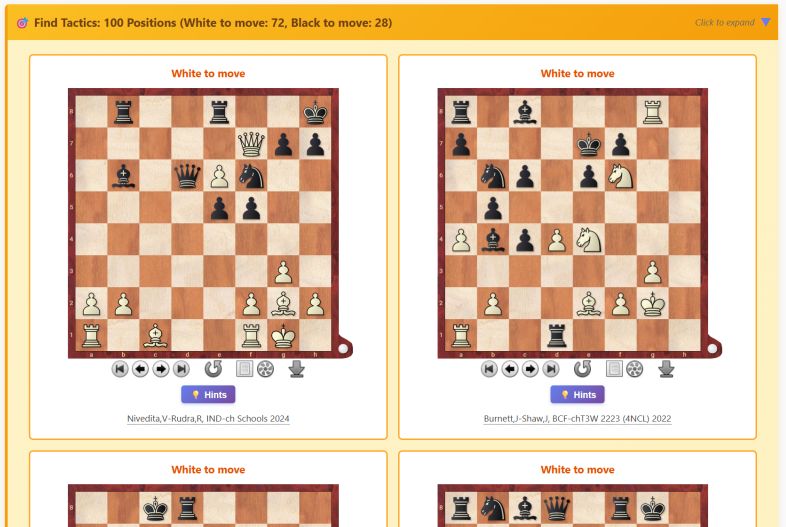
And just when you think it can’t get better, there’s a bonus: Typical Tactics arising from the position. These sharpen your pattern recognition, making it easier to spot key motifs during practical play. Coaches, too, will find this invaluable for creating fresh training material.
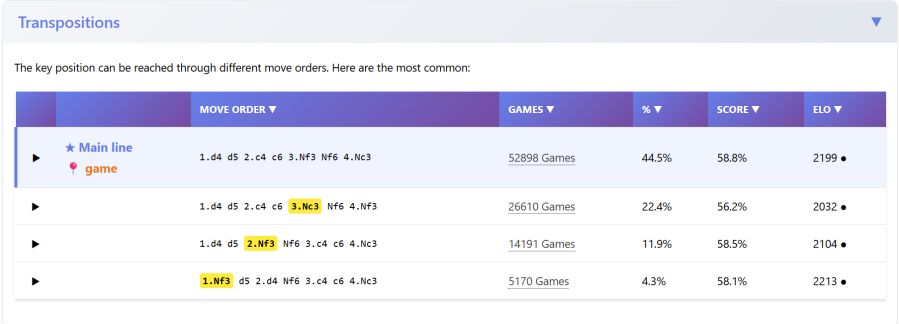
And finally they also mention all the possible Transpositions to this position so that you may know of the different ways to reach the said position.
Suggestions:
-
Run the Opening Report before diving into a new line—it will highlight the main and critical variations to focus on.
-
Pay attention to rating-specific statistics to see how the line performs in your and your opponent’s rating range.
-
Identify elite “model players” for your chosen opening and study their games to absorb best practices.
-
Look at early games of the position to learn how classics were played and to identify core ideas.
-
It is possible to save these analysis. Do it, so you don’t have to again.
AI Consult [NEW FEATURE]
Not long ago, I was part of a discussion where someone asked: “Will there ever come a day when AI can coach effectively?” The consensus was that such a day was far off. Yet, after exploring the AI Consult option in ChessBase´26, I’m inclined to disagree. The future may be closer than we think.
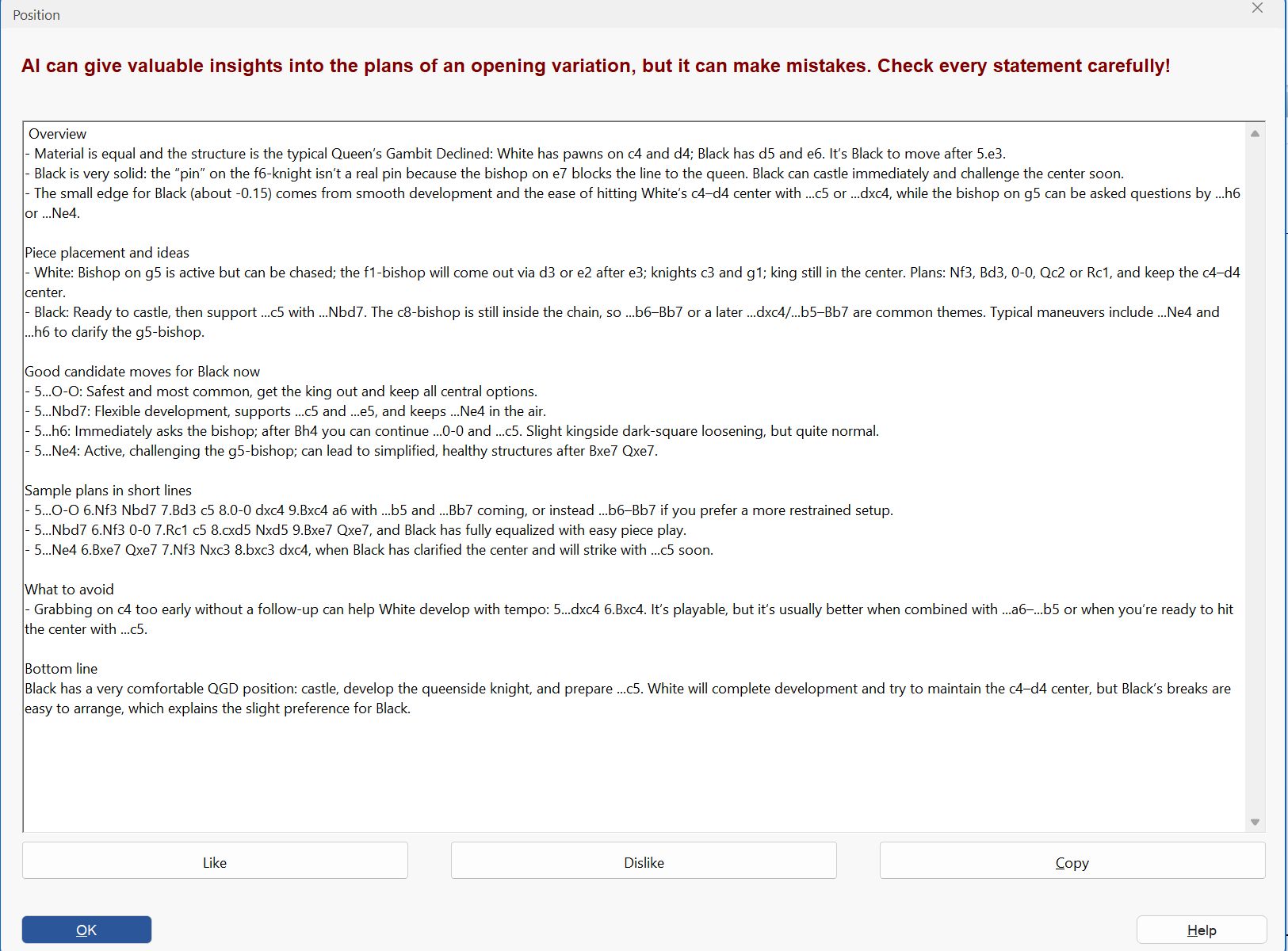
AI Consult (click to enlarge)
With clear, human-like explanations, AI Consult breaks down any position in simple, accessible language. It doesn’t just crunch numbers, it teaches.
If the Opening Report is the ice-cold, precise, and data-driven then AI Consult is the fire. Instead of statistics, it offers a human perspective: analyzing games, explaining plans for both sides, outlining expected pawn structures, and mapping out typical continuations. It tells you what to do, when to do it, and why it matters. This makes it especially valuable for beginners and intermediate players who need guidance beyond raw data.
Of course, no AI is flawless. AI Consult can occasionally be error-prone, so it’s wise to take its advice with a grain of salt. Still, in nearly all my tests, the insights were impressively accurate and genuinely useful.
To access: Board -> Position of Choice -> Report -> Consult AI
Suggestions:
-
Use AI Consult whenever you want to understand an opening position more deeply—it will highlight the plans and ideas behind the moves.
-
Absorb the explanations carefully, focusing on the key aspects of the position that will guide your play.
Surveys
Surveys have been part of ChessBase for several editions, and in ChessBase´26 they continue to shine as a powerful time-saving tool. Synced with your Playchess account, they form a massive hive of collective data—built by players, for players.
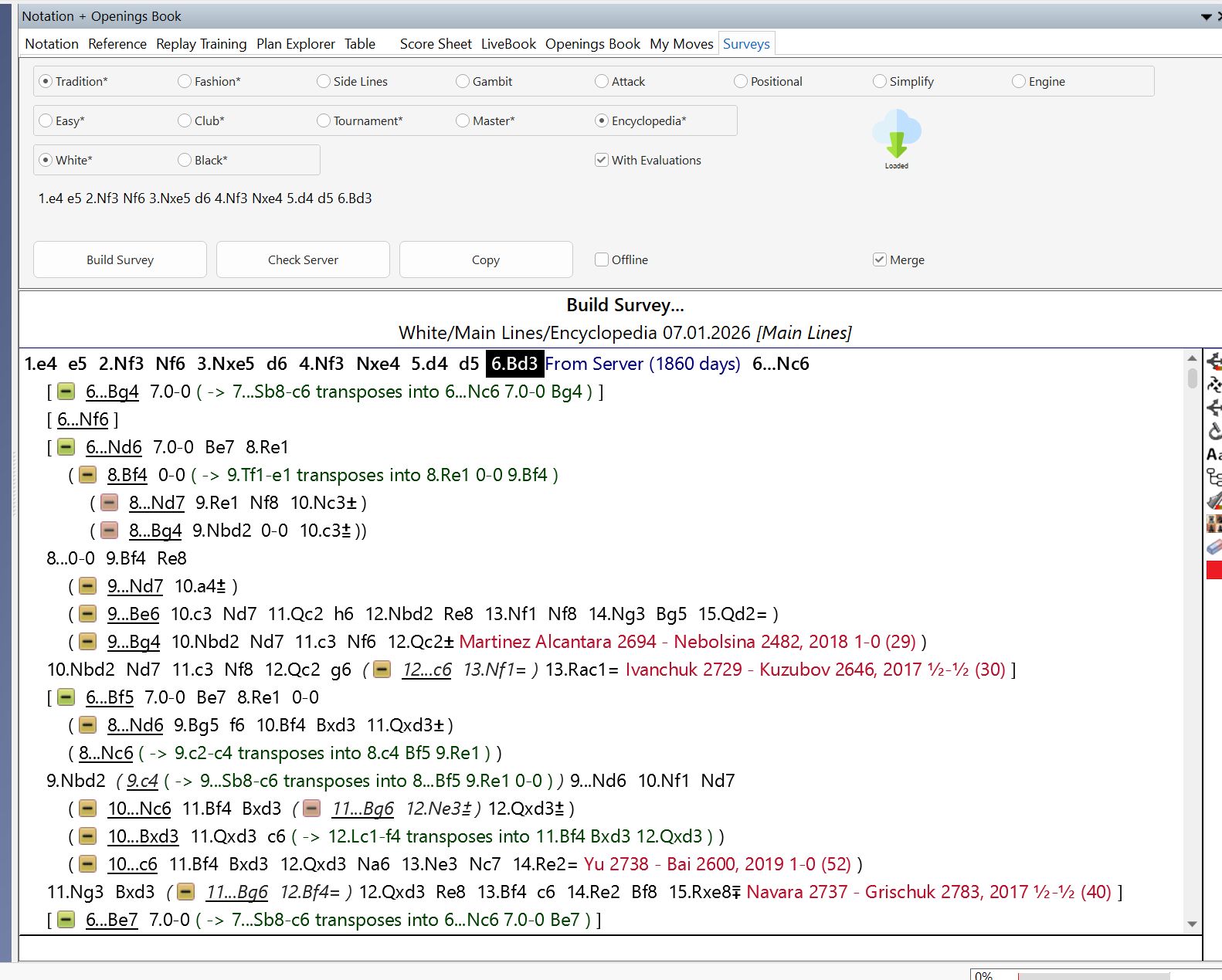
Survey (click to enlarge)
Suppose you’re preparing the French Advanced Variation. Simply navigate to the position, click on Surveys, select the difficulty level (from Easy to Encyclopedia), and choose the color you want the survey for. If another player has already created a survey with the same configuration, you can access it instantly, no effort required. If not, you can build your own survey with a single click, while your computer does the heavy lifting in the background.
Surveys compile all possible opponent lines, along with options for your side, reaching a certain depth and evaluating the position. It’s a shortcut compared to grinding through engine analysis manually. Even better, you can let surveys run while your computer is idle—saving you time and energy.
That said, surveys aren’t the final word. Think of them as a solid foundation rather than a finished masterpiece. It’s wise to double-check with engines, go deeper where necessary, and expand the analysis to suit your repertoire.
To access: Board -> Notation Pane -> Survey -> Choose option you want.
Suggestions:
-
Before diving into opening analysis, check if a survey already exists—it’s a quick way to grasp the basics.
-
Use the survey as a starting point, then refine and expand it with your own work.
Deep Analysis
Deep Analysis is one of ChessBase’s most thorough tools, designed to reveal how engine preferences shift as search depth increases. Give it a position, and the computer constructs a move tree, running engines progressively deeper at each branch.
Imagine you’re analyzing options like e4, d4, or c4. The engine explores one branch say e4 at depth 30, then evaluates the opponent’s replies at the same depth, continuing until a certain point. It then moves to the next branch, repeating the process. Once all lines are covered, the engine circles back and pushes everything one layer deeper: depth 31, depth 32, and so on.
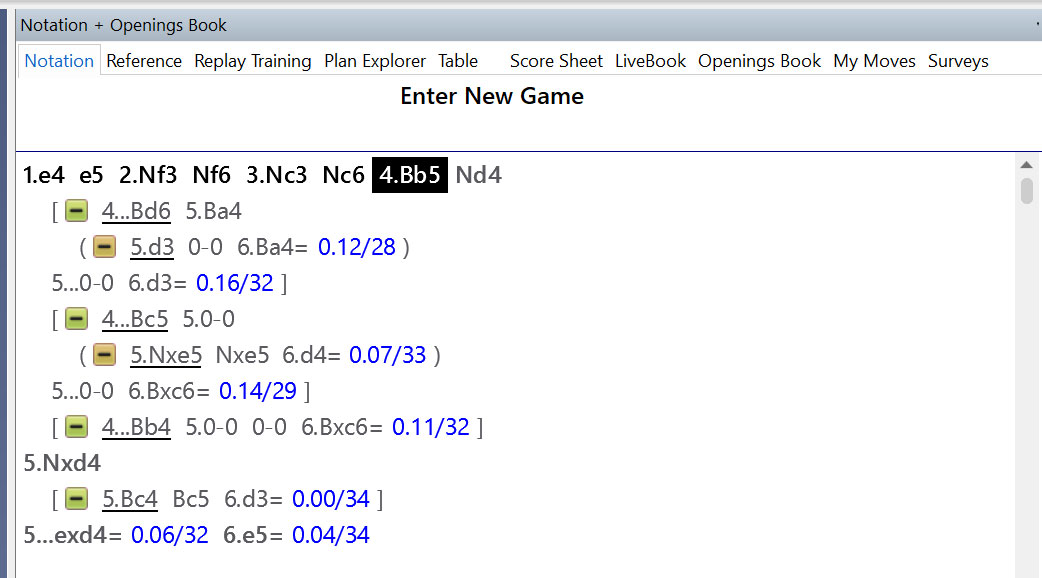
ChessBase records every deviation from earlier evaluations, showing exactly when and where the engine’s preferences change. This makes Deep Analysis particularly useful when exploring new openings—you gain a clear sense of the basic directions across multiple lines. While the process is time-consuming, it’s remarkably reliable, offering a “foolproof” way to map out the landscape of an opening.
To access: Board -> Position of Choice -> Analysis on the top pane -> Deep Analysis
Suggestions:
-
Because Deep Analysis is resource-heavy, run it when you’re not actively using ChessBase. Let your computer work while you rest or multitask.
-
By the time you return, you’ll already have a substantial body of analysis waiting for you.
Reference Search
The Reference Search is one of ChessBase’s most powerful time-saving tools. It scans databases containing millions of games and delivers results in mere seconds. Thanks to years of optimization, search times have now been reduced to milliseconds—even when working with massive collections like the Mega Database.
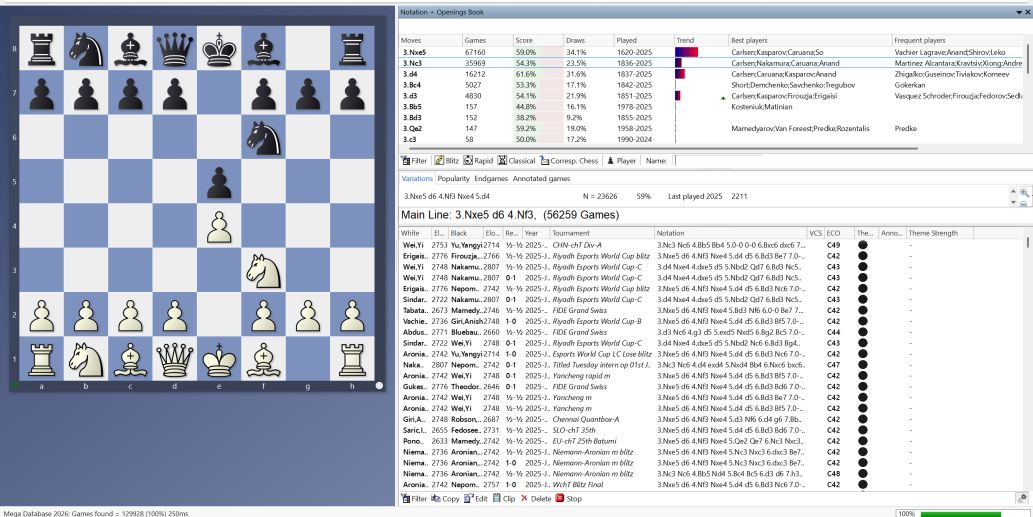
Sorting is highly flexible, with numerous options that let you organize games exactly as you wish.
CB26 introduces expanded classifications and filters [NEW FEATURE]. You can now refine searches by time control Classical, Rapid, Blitz, or Correspondence making it easy to focus only on the formats relevant to your preparation. Additionally, the player name filter allows you to instantly find all games played in a given position, with either color. This helps separate the “music” from the “noise,” ensuring you study only the games that truly matter.
To access: Board -> Notation Pane -> Reference Search.
Suggestions:
-
Use filters strategically to zero in on the most relevant games.
-
Explore all sorting options—some may not be visible at first glance, but they can be invaluable.
-
Take advantage of multi-select sorting. The last option you click takes priority, followed by the second last, and so on.
-
If you want the CB to use another database as reference for its analysis, you can click on the database go to properties, and select as reference DB, and CB will now use this database instead of the Mega to work.
Piece Hover [NEW FEATURE]
One of CB26’s most visually intuitive upgrades is the Piece Hover feature. When you hover your cursor over a piece, ChessBase highlights its potential paths using data from either the Reference Search or Monte Carlo Analysis (we’ll explore the latter shortly).
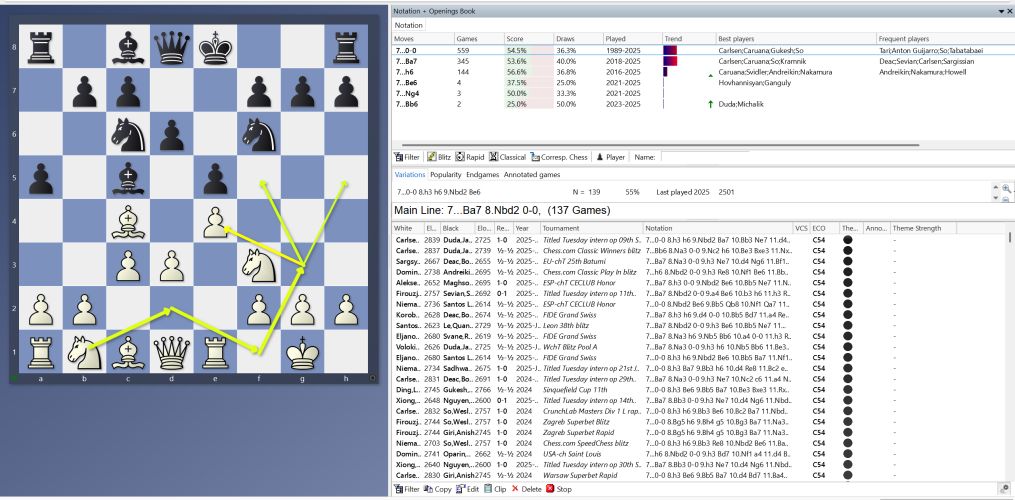
Piece hover of Reference search and Monte Carlo
The paths are color-coded: green indicates moves with strong winning percentages, while red signals less promising options. A pointed arrow shows a standard move, whereas a circle marks the piece being traded there. This simple visual cue transforms raw statistics into an easy-to-grasp roadmap of possibilities.
Picture yourself in the middle of preparation, staring at a position with thousands of games behind it. Instead of manually combing through endless examples to spot recurring patterns (which you should still do when time allows), you can now lean on Piece Hover to instantly visualize the strategic plans and typical placements of your pieces. It’s like having a tactical GPS guiding you through the jungle of opening theory.
To access: Board -> Reference or Monte Carlo Engine -> Hover mouse on piece you want to see pattern of.
— To be continued —
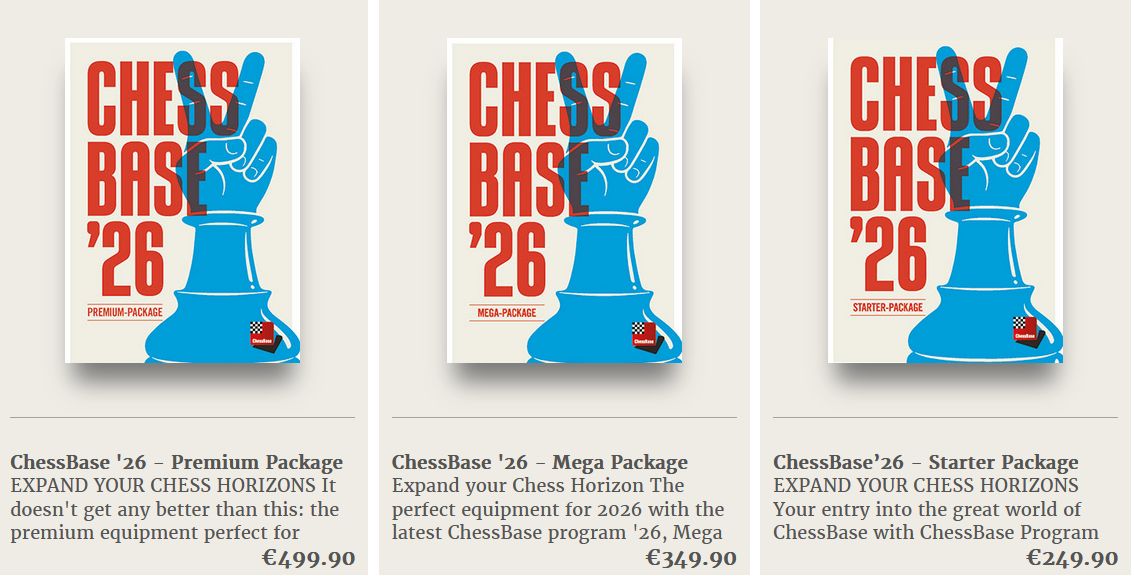
Increase your chess skills dramatically, buy ChessBase 26 now
About the author
 You find an overview of the career of Iniyan Panneerselvam in the author’s bio below. The 23-year-old grandmaster has demonstrated a commitment to philanthropy, aimed at supporting communities during crises. In May 2020, amid the COVID-19 pandemic, he organized a 72-hour online blitz chess marathon, playing 271 games against participants worldwide over approximately 45 hours, to raise funds for relief efforts. That collected Rs 121,199 for charity funds. Iniyan stated that he aimed to leverage his chess talent for societal good, providing both financial aid and opportunities for younger players to engage with and learn from grandmaster-level analysis. Here’s a report on this action.
