
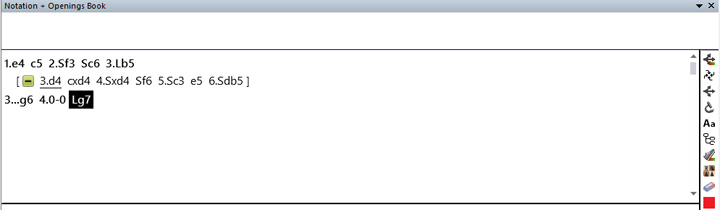
In the first and second parts of this series, we have already shown how easy it is with ChessBase to enter your own games, add variations and switch on an engine. We will simply go back to this position in this episode:
Let us assume that you now want to further examine this Rossolimo structure (characterised by 2…Nc6 and 3.Bb5) and are interested in what kind of positions can arise when White exchanges his bishop on c6 in order to weaken the Black pawn structure.
It is useful to know how the computer evaluates the resulting positions and what moves have been made in such positions in previous games. We explained how to turn on the engine in part 2.
In this third instalment of our support series, we will show you how to use the references and incorporate these two results into your own analyses:
Add references
First, click on “Reference” in the tabs above the notation.
Your screen will change as follows:

Data, plans, practice – the new Opening Report In ChessBase there are always attempts to show the typical plans of an opening variation. In the age of engines, chess is much more concrete than previously thought. But amateurs in particular love openings with clear plans, see the London System. In ChessBase ’26, three functions deal with the display of plans. The new opening report examines which piece moves or pawn advances are significant for each important variation. In the reference search you can now see on the board where the pieces usually go. If you start the new Monte Carlo analysis, the board also shows the most common figure paths.
You can see the reference games next to the board. In the first part of the window, all the moves stored in the database for this position are listed according to their previous occurrence, followed by the frequency of the respective move, its chances of winning and some additional information that we will discuss in later tutorial episodes. In the second window, you can see the most recent games played in this position. Next to it, there is a Quick Board on which you can view these games separately from your analysis board.
If the Quick Board is not visible, right-click while the mouse pointer is over the game list. A window will open, go to ‘List format’ and click on ‘Quick Board’.
Below the references and the Quick Board, you will see your engine window (we will also discuss the arrangement of the windows and how to change their sizes in a later episode).
“Chessbase offers many useful and essential features for advancing in chess. No other chess program gives me the opportunity to study openings and prepare for opponents without the internet.”
Fabian Bänziger (IM, Swiss A-squad member)
Add reference moves to notation
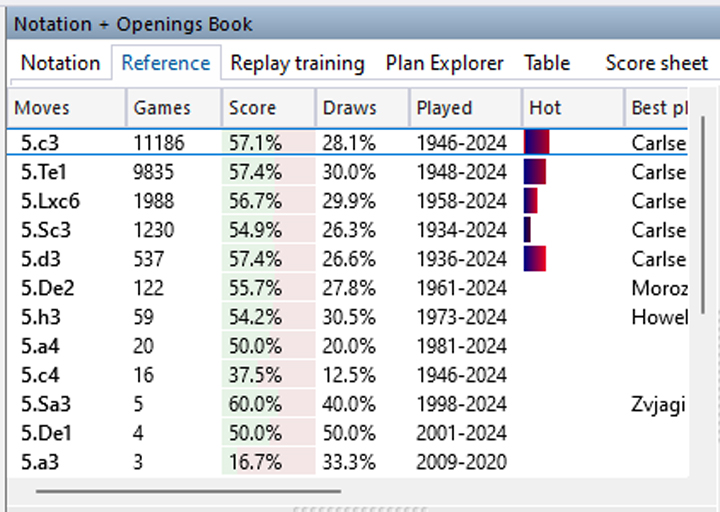 You can switch between the ‘Notation’ and ‘Reference’ tabs as you like. Whenever you execute a move in the notation, the reference area for that move also advances. Conversely, you can click on a move in the reference list and it will be included in the notation – either as a new move at the end of the notation or as a variation. This only ends when there are no more reference games because a new position has been reached.
All reference games to notation
If you want to transfer complete reference games to your notation, then you can right-click on the desired game in the right-hand window and insert it. The following will happen:

If you right-click on the game in the right-hand window, the menu window above will open. Here you can click on ‘Copy to Notation…’. In the example, it is the only game that has reached the position shown on the left.
access your chess data in cloud databases – and 13 million games.
ChessBase Mobile has everything you need as a chess player on the go:
- Access the ChessBase online database – with more than 13 million games: search for players, positions, openings etc.
- Save your own games and analyses in cloud databases
- Synchronise your personal databases across all your devices
- Analyse your games with the built-in engine
- Live opening book: use the most comprehensive and up-to-date statistics for every opening position
- Access your opening repertoire in the cloud: create and edit your personal opening repertoire
- 300 opening overviews, with repertoire suggestions: get started with new systems!
- Practise opening variations with three modes.
- Advanced notation: add comments, symbols, variations, arrows and markings to your games
- Advanced sharing options: share games and positions via link, image, GIF, FEN or QR code
- PGN compatibility: upload and download games or databases as PGN files
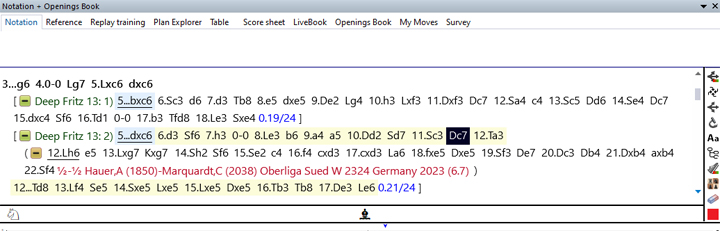
If you then click on ‘Notation’, you will see (below) how the game has been inserted into your notation – including the source and the rest of the game:
Add engine lines to notation
The same principle applies to the insertion of engine variations.

However, in contrast to the insert function in the references, you can also insert individual moves or even several moves at once. To do this, simply click on the move in the desired variation.

If you just hover the mouse over the move, the position will be displayed on the analysis board. If you left-click on the same move, the variation up to this move will be inserted into the notation.
… and now again: Have fun analysing your games, with the reference games and the engine variations!
——
ChessBase has developed over decades to become what it is now in its 2026 version. The program has countless options, which we will present here in small portions – so you can design your interface for pleasant daily use and keep learning about new options and how to use them to get the most out of ChessBase´26 and save time.
Deeper understanding, better preparation, and more effective training – ChessBase’26 and FRITZ 20 take your chess to the next level.
Data, plans, practice – the new Opening Report In ChessBase there are always attempts to show the typical plans of an opening variation. In the age of engines, chess is much more concrete than previously thought. But amateurs in particular love openings with clear plans, see the London System. In ChessBase ’26, three functions deal with the display of plans. The new opening report examines which piece moves or pawn advances are significant for each important variation. In the reference search you can now see on the board where the pieces usually go. If you start the new Monte Carlo analysis, the board also shows the most common figure paths.
We hope that this tip will help you to have more fun and be more successful when using ChessBase´26. You can find more tips and hints on our support pages and FAQ pages.
All parts of the series and more links:
